
Help · Your invitation site
Set your languages and web address
Your invitation can speak up to four languages: English, Spanish, French and German. Here you also choose the end of your invitation's web address.
1. Open the Design tab.
In the sidebar, click Configuration, then Design.
2. Choose your web address.
In URL Slug, type the end of your address. With `julie-hans`, your public page becomes selovera.com/weddings/julie-hans.
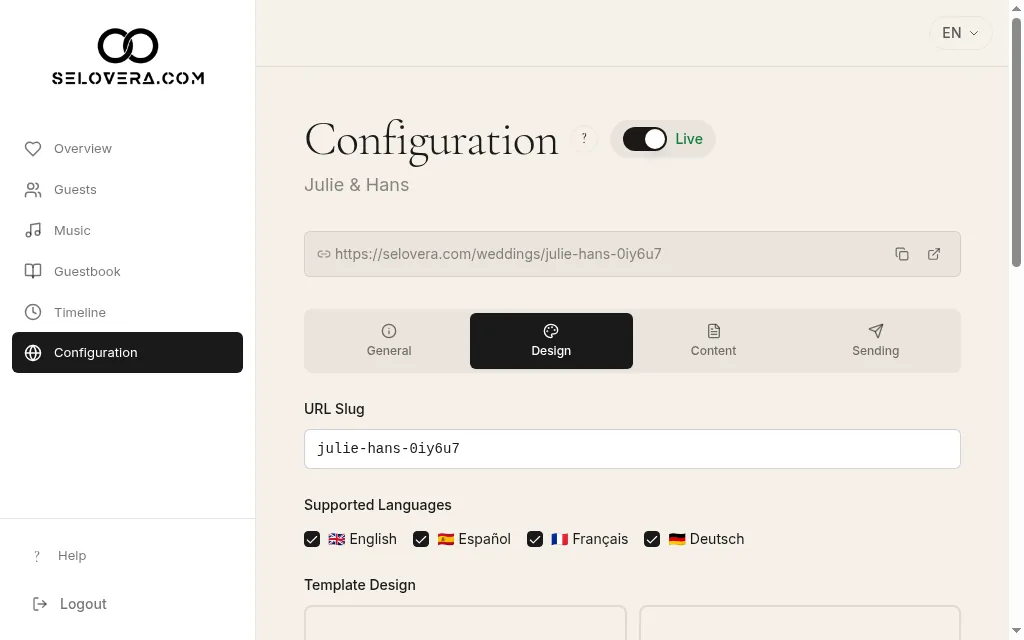
Design tab, site address and supported languages 3. Tick your languages.
Under Supported Languages, tick every language you want to offer. You need at least one; otherwise you'll see "Select at least one language".
4. Save.
Click Save Website Settings at the bottom of the page. Changes are not saved automatically.
Tips
- Guests can switch between your languages on the invitation.
- Each guest's invitation opens in the Invitation Language you set for them on the Guests page.
- Once you've added a language, write your texts in it too. See the guide on writing your texts.
- Changing the web address after you've sent invitations changes your public link. Each guest's personal link keeps working.
Related guides
Open this page in your dashboard
Still stuck?
Write to us at info@selovera.com or use the Contact Support form, and we'll gladly help.