
Help · Your invitation site
Show, hide and reorder sections
Your invitation is built from sections, such as the countdown, your story, the gallery and the RSVP form. Show only the ones you need, in the order you like.
1. Open the section list.
In the sidebar, click Configuration, then Content.
2. Show or hide a section.
Tick the box in front of a section to show it on your invitation, or untick it to hide it.
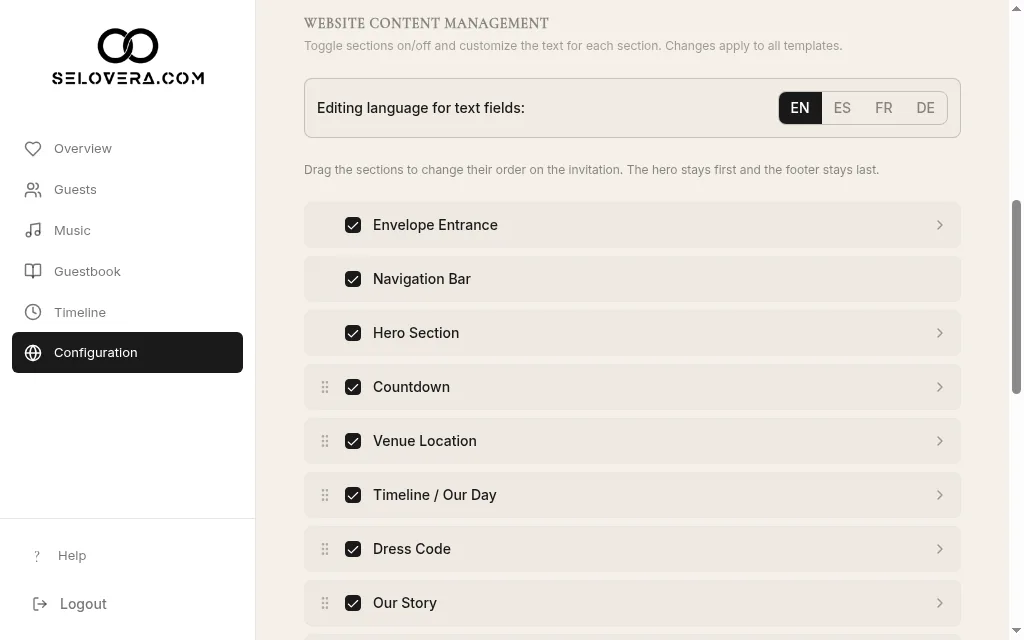
Section list with checkboxes and drag handles 3. Change the order.
Drag a section by its handle to move it up or down. Envelope Entrance, Navigation Bar and Hero Section stay at the top, and Footer stays last.
4. Save.
Click Save Website Settings at the bottom of the page. Changes are not saved automatically.
Tips
- Some sections also hide themselves when you leave their text empty, such as Dress Code, Our Story and Gift Registry.
- Share your photos also needs a photo album link before guests can use it.
- Guests can only suggest songs if Add your music is switched on.
- Use Preview invitation site to check the result.
Related guides
Open this page in your dashboard
Still stuck?
Write to us at info@selovera.com or use the Contact Support form, and we'll gladly help.