
Help · Account
Delete your account
If you no longer need Selovera, you can delete your account. This removes everything for good, so please read this first.
1. Save what you want to keep.
Export your guest list from Guests (Export) and your guestbook from Guestbook (Export PDF).
2. Find Delete Account.
Go to Configuration › General and scroll to Delete Account. Click Delete My Account.
3. Confirm.
The Delete Your Account dialog explains that your account, your wedding website, all guests, photos and configuration will be permanently deleted. Type DELETE in the box.
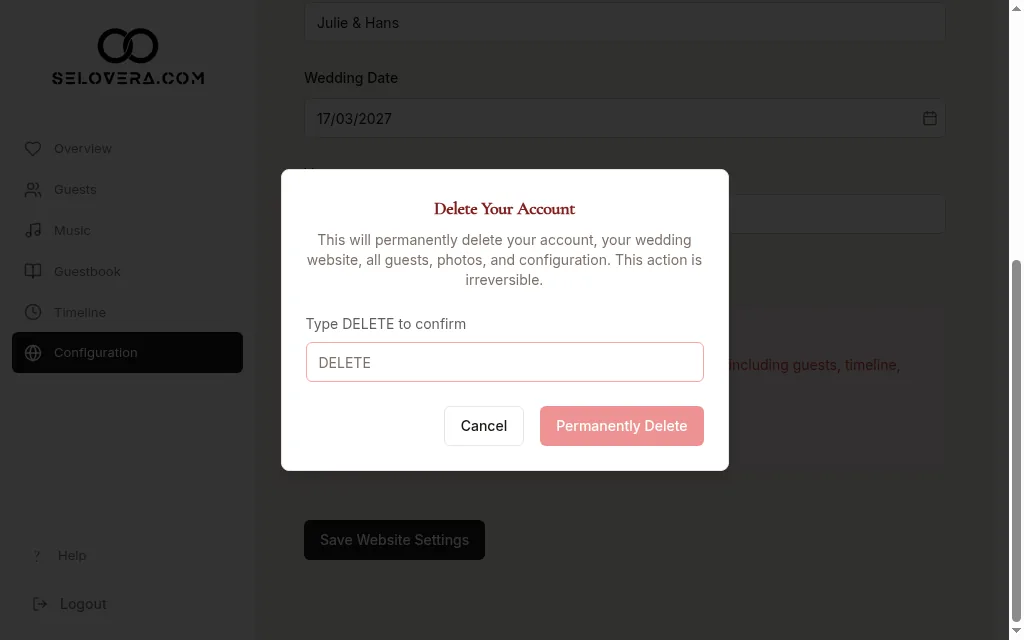
Delete confirmation dialog 4. Delete.
Click Permanently Delete. Changed your mind? Click Cancel instead.
Tips
- This can't be undone. Your wedding website is deleted too, so guests can no longer open it.
- You'll see "Your account has been deleted." when it's done.
Related guides
Open this page in your dashboard
Still stuck?
Write to us at info@selovera.com or use the Contact Support form, and we'll gladly help.